Understanding the Cuttle interface
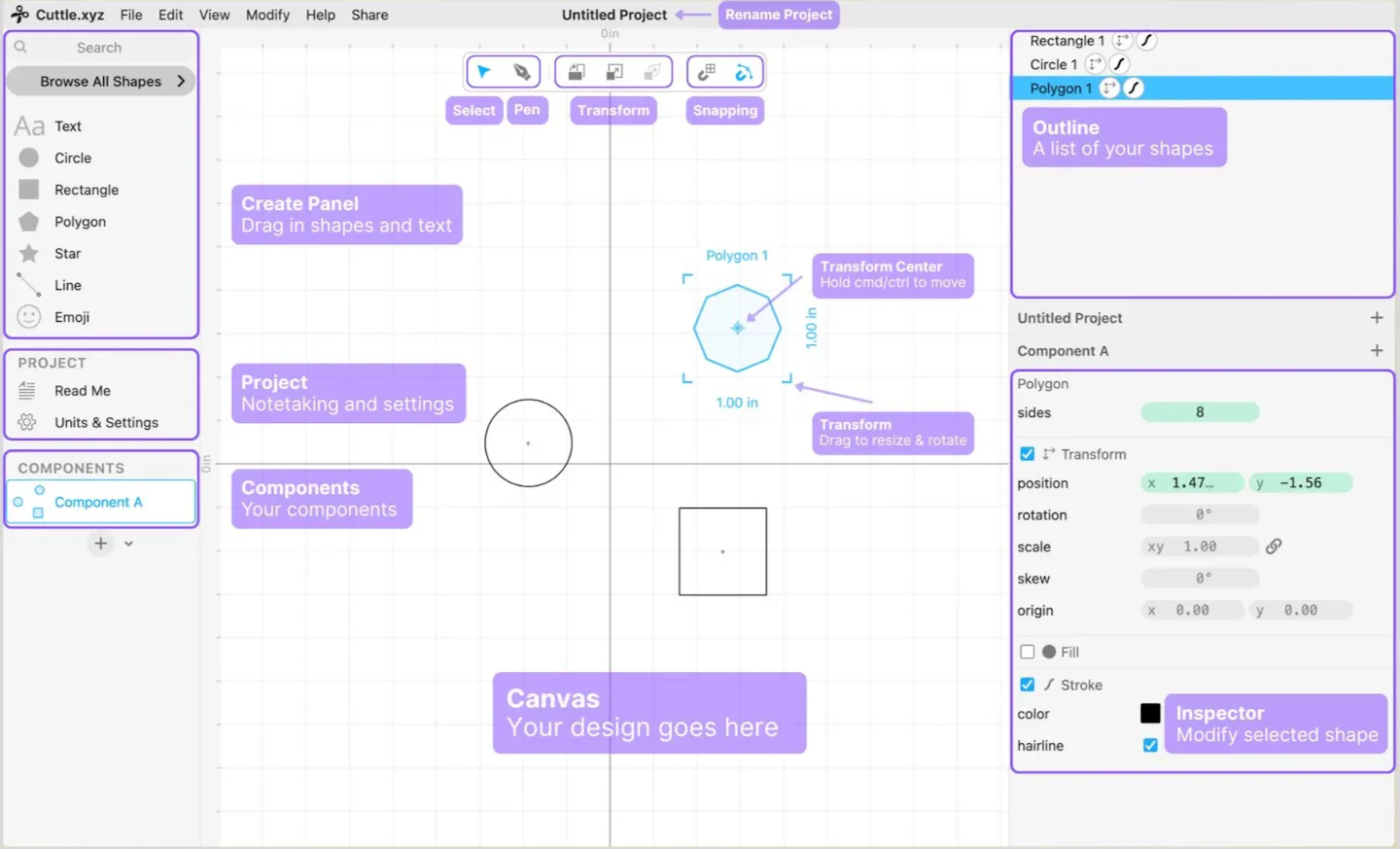
Pan and Zoom the Canvas
Mouse with wheel
- Turn on View > Use Scroll to Zoom.
- Scrolling will zoom the canvas.
- Drag with right mouse button to pan.

Trackpad
- Turn on View > Use Scroll to Pan.
- Scrolling will pan the canvas.
- Pinch to zoom, or hold
cmd/ctrland scroll to zoom.
Other ways to Pan
- Hold
spaceand drag. - Click scroll wheel and drag.
Other ways to Zoom
- Press
+or on the keyboard. - Hold
cmd/ctrland scroll.
Change Units (in, mm, etc.)
Configure your project’s default units and other settings from the Project menu in the left sidebar.
Version History
Cuttle will automatically save your work.
Additionally, every time you export a file, that version will be saved to your history. You can also explicitly save a version with File > Save a Version.
You can access and restore any previous version with File > Browse Version History.