Jigsaw Puzzle
 Cuttle Official
Generate a custom wooden jigsaw puzzle! Pick your own photo or artwork and customize the number of puzzle pieces and piece size.
👇 Scroll down to download the individual files! (Picture PDF, Blank Cut, Jigsaw Puzzle Cut) 👇
Video Tutorial
How to Use
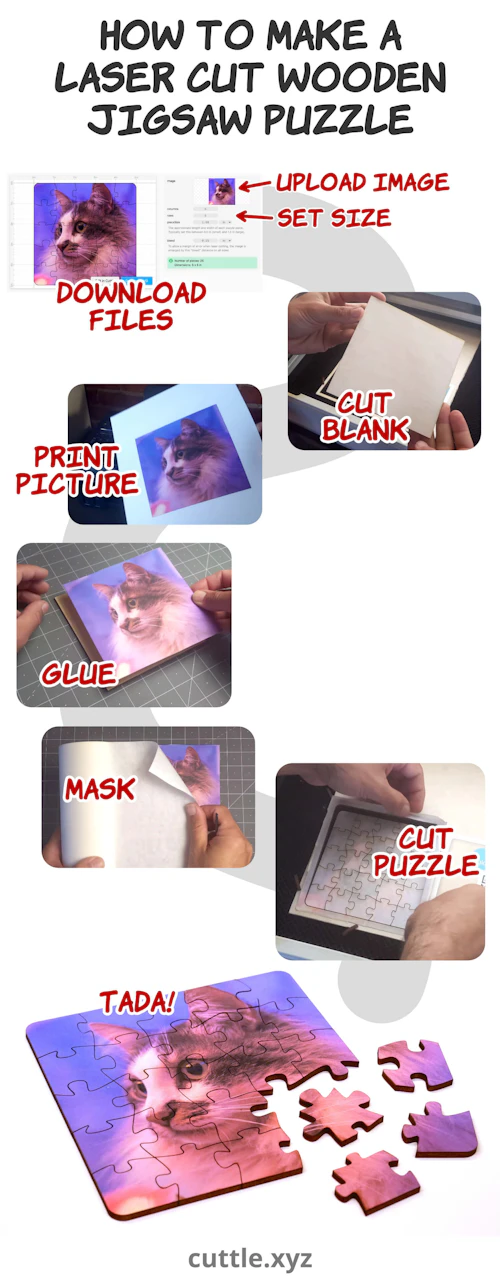
Step 1: Customize Your Puzzle
In the preview above, choose the photo or artwork
imagethat will appear on the puzzle.Customize the
columns,rows, andpieceSizefor your puzzle.
Step 2: Picture Print
Below, click "Download PDF".
Print on your inkjet or laser printer. (Make sure to choose "Scale 100%" in your printer options.)
Cut the picture out along the black border.
Step 3: Blank Cut
Now we'll pre-cut our material to size and glue the picture from the previous step to this blank.
Below, click "Download SVG".
Cut on your laser cutter.
Take the masking off one side. If your material is pre-finished, sand off the finish with ~100 grit sandpaper.
Glue the picture from the previous step to the blank using spray adhesive.
Re-apply masking on top of the picture.
Step 4: Jigsaw Puzzle Cut
Finally, laser cut the puzzle design.
Below, click "Download SVG"
Put the blank with the picture back into your laser cutter
Center-align the Jigsaw Puzzle Cut design inside the blank and cut.