Bottle Cap Display
 wijitworks
Show off your collection, not just store it.
This Bottle Cap Display template turns your saved caps into a clean, customizable display piece. Whether it’s from travels, favorite brews, or just a fun collection, you can create a personalized holder that looks great on a shelf or desk.
Add your own message, adjust the layout, and even swap in different silhouettes to match your style.
Overview
This template creates a laser-ready bottle cap display with:
Parametric hole layout sized for standard bottle caps
Customizable top message
Optional retaining tabs to hold caps securely
Everything is adjustable so you can fine tune fit, spacing, and overall size.
How It Works
Set your tile size to match your bottle caps
Adjust spacing to control layout density
Enable retaining tabs if you want caps to snap in place
Add your message and position it
Adjust silhouette scale if needed
Export and cut
Tip: Do a quick test cut to dial in fit before running a full board.
Not all bottle caps are the same!
Customization Ideas
BYOB party boards
“Dad’s Caps” or gift displays
Travel or brewery collections
Sports or themed cap collections
Bar or man cave decor
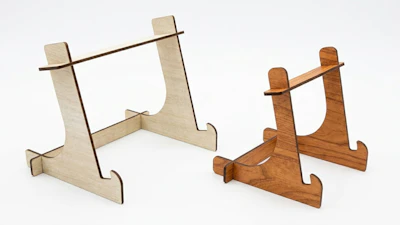
Create a custom stand for your display

Additional Notes
Choose solid silhouettes when swapping shapes
Thin or detailed shapes can weaken the structureIrregular shapes may need extra adjustment
Use spacing and positioning controls to keep holes inside the shapeMake sure your text connects to the main shape
Floating text will cut separately and won’t be supported