Kids Handwriting Ornament
 Tara
Tara
Select the custom emoji by clicking emoji, clicking add icon, and selecting your uploaded file. Because images uploaded will vary in size and positioning, this template will require a bit of parameter adjusting to get it sized and positioned to your liking.
Important Tips:
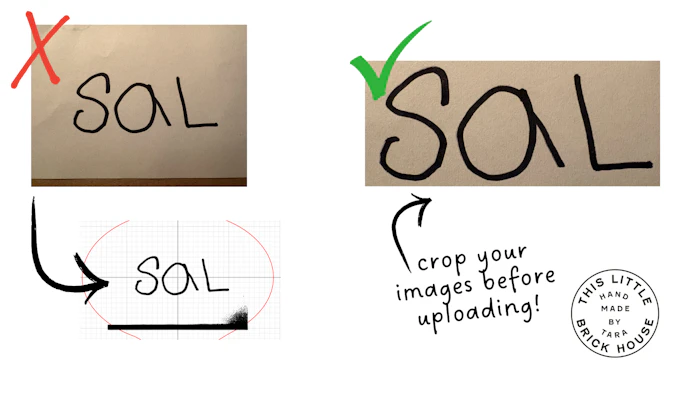
It is necessary to add an image that is a black or dark color writing on plain white or light colored background. It is also important that the wording be centered in the image with only white around it (crop if necessary).
Depending on the image you upload, you may have to use the X & Y position parameters to place the name centered. You may also need to scale the name up or down depending on your source image. Please check overall dimensions in bottom left corner before downloading. and adjust scale parameter as needed.
See below for troubleshooting
Troubleshooting: If you are getting unwanted engravings on your icon, you need to crop out anything else visible in the image, this includes shadows! For example, if your photo looks like the first photo on the left, it will load like the photo below it. You must crop it like the third photo!