Faux Stitch Initial Tags
 Tara
TaraCreate these faux-stitch initial tags by selecting the tag and initial style, and updating the initial. You can change the fonts, and adjust the sizing/position for the oversized style.
To achieve the faux-stitch look please read below for helpful tips.
Material used: may contain affiliate links
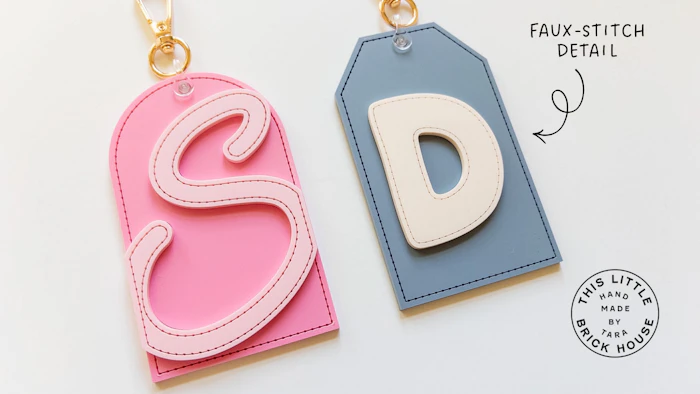
Faux stitch details:
To achieve this look, I recommend doing a de-focused score for all green strokes. A regular score will work too, but de-focusing has a better effect. It involves setting your laser head to be slightly out of focus to create a wider beam. I HIGHLY recommend testing your own settings, but here are the settings that I use:
Glowforge: Speed 225; Power 95; & manual focus height of .02" added
Thunder 100W (2 year old tube): Speed 30mm/sec; Power 40%; Z-offset (negative) -0.2"
Any black residue leftover can be cleaned up with isopropyl alcohol.