Image Trace in Cuttle - Vectorize PNGs and JPGs ✍️
JAN 24, 2025
Here's the latest with Cuttle.
- New Editor feature: Image Trace
- New Pro Fonts: Cakepop, September, Amsterdam, Motena Golden, Goldie Rainbow, Penthouse
- Cuttle Editor Tutorial: Easter Egg Ornaments with Multiple Layers
- Cuttle Editor Tutorial: Designing decorations on the Easter Egg
Image Trace - Vectorize PNGs and JPGs ✍️
We have a new beta feature in the Cuttle Editor called Image Trace.
It lets you instantly turn an uploaded PNG or JPG image into a vector shape that you can cut.
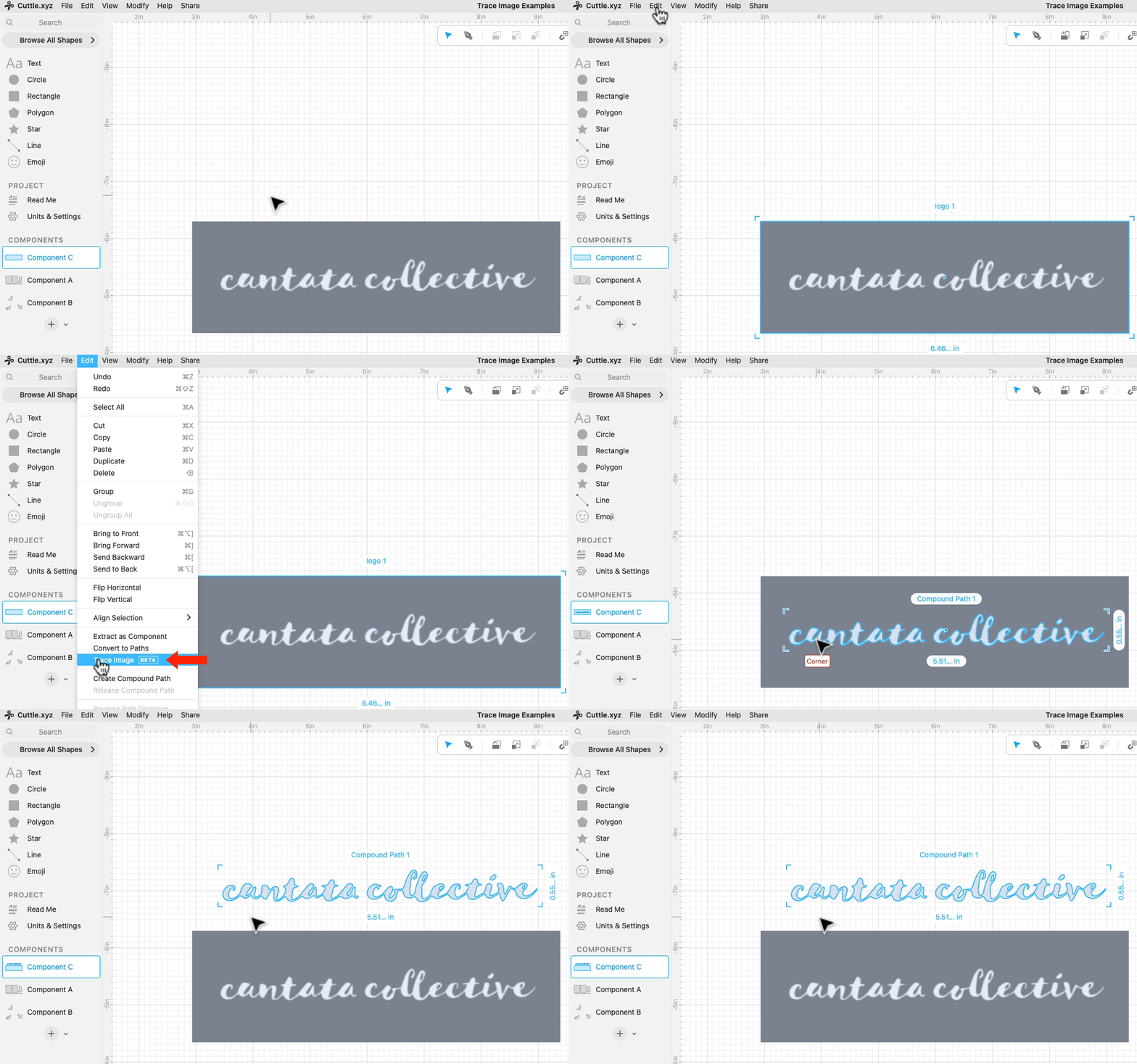
To use it, import a PNG or JPG image, select it, and do Edit > Image Trace.
Image Trace works best with simple, two-colored images like:
- Silhouettes
- Logos
- Black and white drawings made in other programs (like Procreate)
- Photos of hand drawings

Image Trace also works well with images where you’ve removed the background.
- Start with a photo
- Remove the background to create a PNG where the background is transparent
- Import that PNG into Cuttle and do Edit > Trace Image

Once you’ve vectorized an image, you can then:
- Cut the shape out (great for silhouettes!)
- Create an offset for a cutout
- Make edits to the shape by editing its paths
- Do anything else with the shape in the Cuttle Editor (weld it, etc.)
This new feature is in beta, so please let us know if you run into any issues. You can reply to this email or chat with us in the Discord #beta-testing channel.
New Pro Fonts

We licensed seven new Pro Fonts for the font library.
Cakepop, September, and Amsterdam are by KA Designs.
Motena Golden and Motena Golden Script are by Suby Studio.
Goldie Rainbow (Balpirick) and Penthouse (Airotype) also include tails.
Video Tutorial: Easter Egg Ornaments with Multiple Layers

In Federico’s livestream from last week, he answered TyeLinda B’s request for an Easter Egg Ornament. He uses the Pen Tool in combination with the Mirror Repeat modifier to create decorative patterns. He also uses Connected Text and the Fit Within modifier so you can easily personalize the ornament.
Here’s the template he created.
Video Tutorial: Designing decorations on the Easter Egg

In Federico’s livestream yesterday, he showed more tips for creating decorative designs on the Easter Egg. He shows how he combines shapes and uses modifiers like Mirror Repeat, Flatten, and Weld And Score to rapidly create symmetric designs.
Here’s the project he created.
Live streams are on our Facebook Group on Thursdays at 1pm PT / 2pm MT / 3pm CT / 4pm ET. See you there!
Other Improvements and Fixes 🐞
- Fixed a bug with Weld And Score that was occasionally causing erroneous score lines. Thank you for the bug report TyeLinda B and others on the Facebook group!
- In the Parameter Type menu, we renamed Boolean to Checkbox.
- Removed the confusing Edit > Create Path menu item. Thank you for bringing this to our attention, Nicholas G.

Toby Schachman