How to price the Crossword Ornaments + Giveaway: win a free year of Cuttle Pro
NOV 25, 2025
Here's the latest with Cuttle.
- How to price the Crossword Ornaments
- Win a free year of Cuttle Pro
- Cuttle Editor Tutorial: Slot-Together Ornaments
- Cuttle Editor Tutorial: Make a Rattan Weave Pattern
How to price the Crossword Ornaments
The new Family Names Crossword Ornament overtook the classic Family Names Tree Ornament as the most popular template on Cuttle this Christmas season!
There’s a fantastic thread in our Facebook Group about how folks are pricing and packaging the Crossword ornaments. Here are some helpful data points:

Check out this stash from Ann W who reports, “I’m selling a lot of them!”

Tommy C is making these as both 3.9” ornaments and as 12” round signs. You can make signs by unchecking the “hole” option.

Lynn H glues on little cut out snowflakes as ornamentation.

Malissa SS scores snowflakes on the backers.

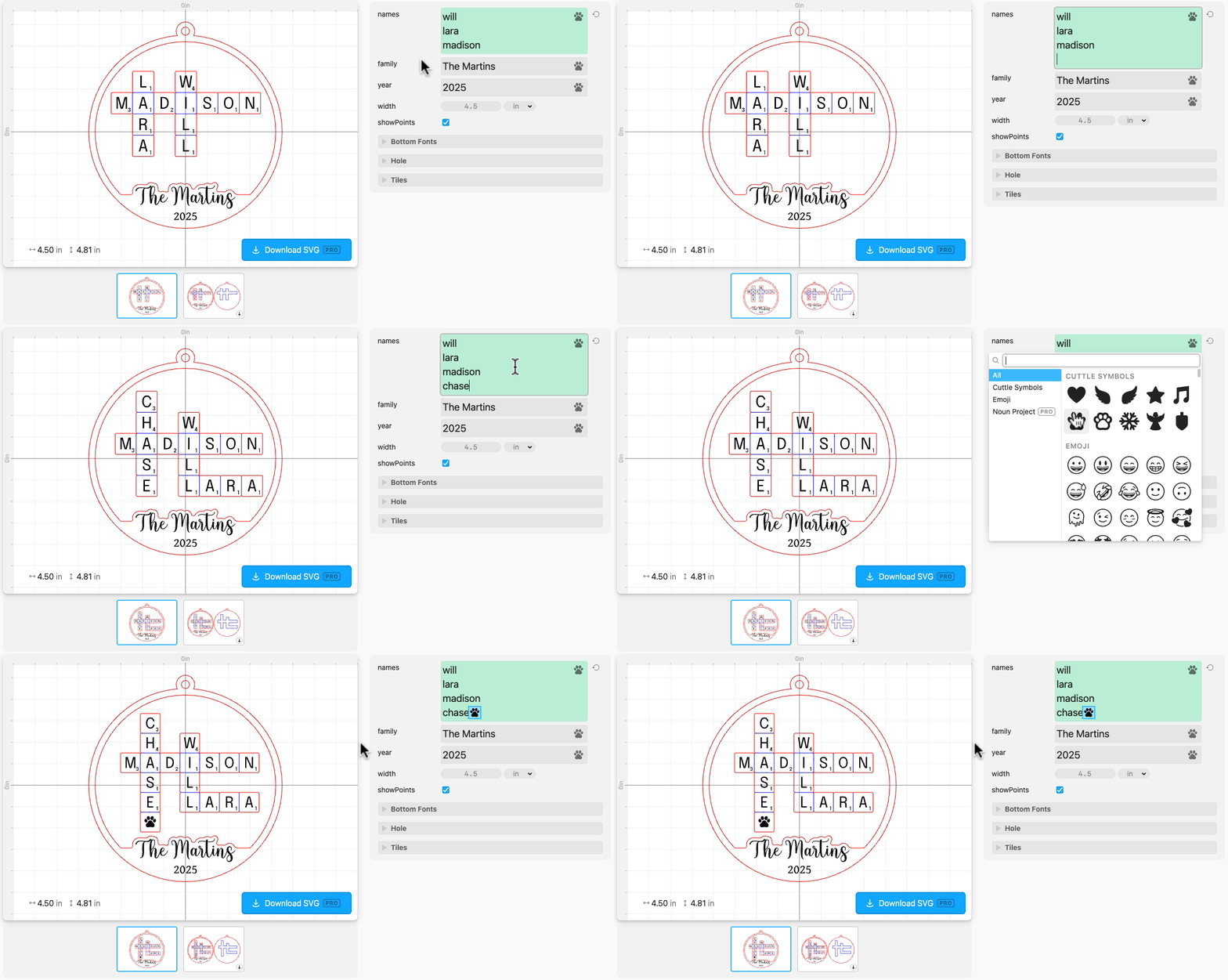
Don’t forget you can add Paws and other icons as letters!
Below, Anna RB adds paws and Debby C adds cat silhouettes!

You can add Paws and any other icon to any text field in Cuttle. Just click the Paw icon in the text field to open the icon picker.
Win a free year of Cuttle Pro

Give away time!
We’re looking to grow the new Cuttle Facebook page, so we’re running a give away for new followers.
One lucky winner will receive one free year of Cuttle Pro!
To enter:
- Follow our page at https://www.facebook.com/cuttlexyz
- Leave a comment on the pinned post telling us the name of your favorite template or favorite Cuttle Creator
- That’s it!
⏰ Giveaway ends: November 28, the Friday after Thanksgiving
🏆 Winner selection: We’ll randomly choose from the comments and announce the winner on the page and via DM
Good luck — and thanks for being part of our community! 🙌
Video Tutorial: Slot-Together Ornaments

In this livestream, Federico shows how to make slot-together ornaments, and how to use Cuttle to make them adjust to any material thickness.
No livestream this Thursday (Thanksgiving) but Federico will be back Thursday Dec 4. Livestreams are on our Facebook Group, Thursdays at 1pm PT / 2pm MT / 3pm CT / 4pm ET.
Video Tutorial: Make a Rattan Weave Pattern

In this livestream, Federico shows how to make a faux rattan pattern including score lines to give a weave effect.
Other Improvements and Fixes 🐞
- Added a feature to let you upload your own icons to the Icon Picker. I’ll write up a more detailed look at this in a future newsletter!
- Added snowflake, angel, and dreidel to the Cuttle Icons
- Cuttle Editor: Added View > Show Guides. This lets you quickly show and hide all guides. Very handy for quickly previewing what your design looks like without the circle and rectangle center dots, etc.
- Cuttle Editor: Improved auto-save resilience when there are network hiccups
- Performance improvements for Weld And Score and Remove Overlaps
- Bug fixes for the Fit Within modifier

Toby Schachman