Graduation Centerpiece Sign and Photo Prop - SVG Generator 🎓📸
APR 11, 2025
Here's the latest with Cuttle.
- New template: Graduation Centerpiece Sign and Photo Prop
- Cuttle user Diane McLeod (A Wee Bit Southern) interviewed on “The Riley Black Project” Podcast about her new Cuttle Etsy store
- Cuttle Editor Tutorial: Make a Box with a Wide Base
Graduation Centerpiece Sign and Photo Prop 🎓📸

Our latest template is a Graduation Sign that can be used as the Centerpiece on the dessert table or as a Photo Prop for senior pictures.
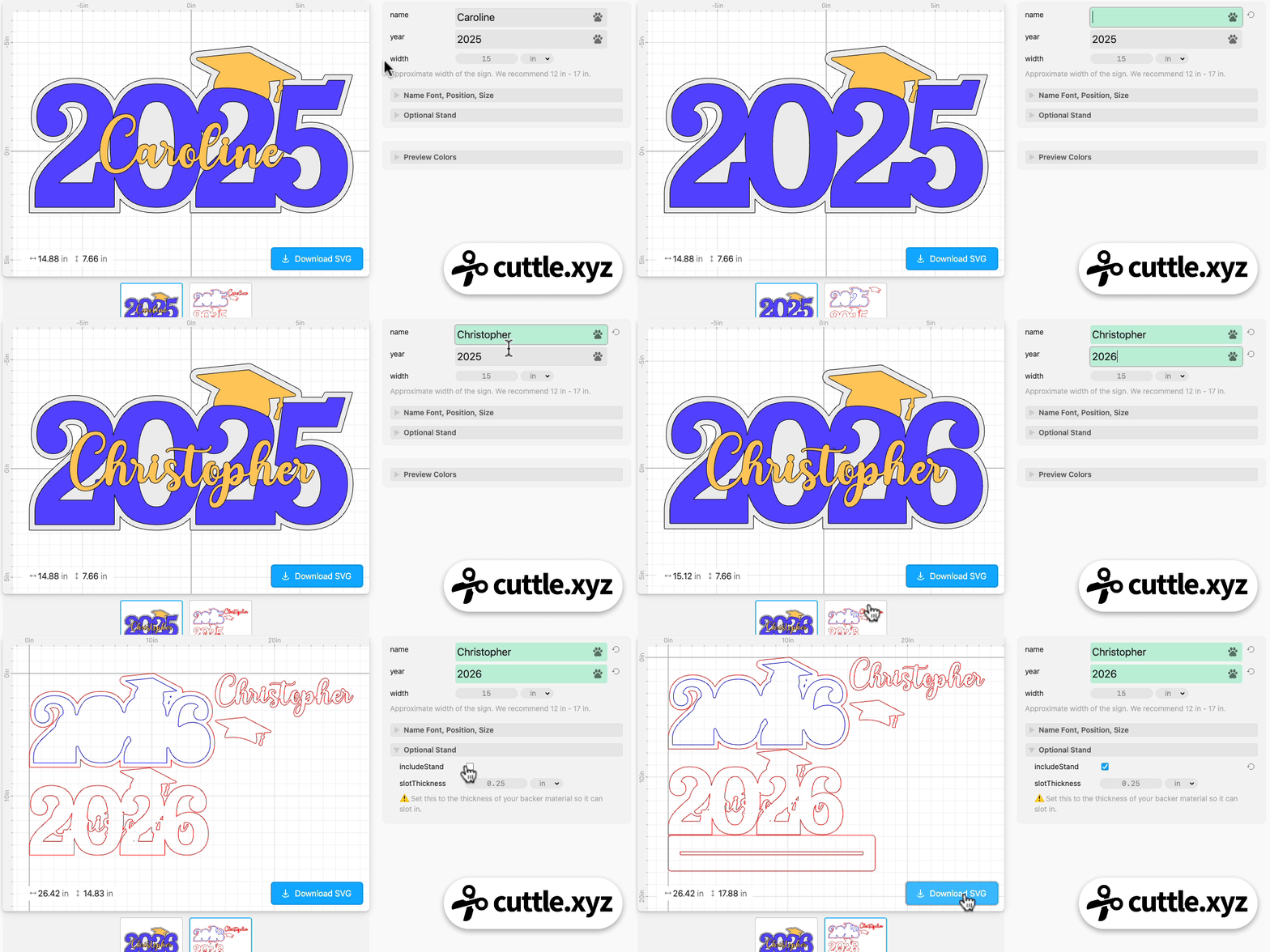
- Type any name and year to instantly generate a three-layer SVG cut file — backer, year, and name/cap.
- All the welding and offsetting is done automatically for you.
- Choose any font for the name. Dots on i’s are automatically connected for you.
- Generate an optional stand by entering your material thickness — this determines the size of the slot. The sign can easily be removed from the stand for use as a photo prop for pictures before the party.
- Choose any colors for the Preview image. Plan out how your school colors will look or instantly generate design proofs for your customers.
- The name is welded to the year layer, providing a solid place to glue it.
- An inset score line is added to the backer to help you center the year layer on it.
- Enter any width for the sign (we recommend a 12 in - 17 in wide sign).
Cuttle user Diane McLeod (A Wee Bit Southern) interviewed on “The Riley Black Project” Podcast 🎙️
We really enjoyed this interview with Cuttle user Diane McLeod on “The Riley Black Project” laser cutting podcast (YouTube, Apple Podcasts, Spotify).
Diane started learning to use the Cuttle Editor by watching Federico’s weekly livestream and she is now designing and selling her own Cuttle templates on Etsy!

All of the above designs and more can be found on Diane’s Etsy store. When you buy the design on Etsy, you get a secret link to an unlisted Cuttle template. Like our official templates, you can then type text and choose options to instantly personalize the designs.
One of our 2025 goals is to get more designers making their own templates in the Cuttle Editor and earning income doing so. We’re really excited to see Diane’s new template design business grow!
Video Tutorial: Make a Box with a Wide Base 📦📹

In Federico’s livestream yesterday, he showed how to make a box with a wider base. He starts from the free Open Box template and opens it in the Cuttle Editor. He gets rid of the tabs on the bottom piece, and replaces them with slots.
Here’s the template he created.
You can catch Federico’s streams live on our Facebook Group on Thursdays at 1pm PT / 2pm MT / 3pm CT / 4pm ET.

Toby Schachman