Dog Bone Christmas Ornament - SVG Generator 🦴
AUG 23, 2024
Here's the latest with Cuttle.
- New Template: Dog Bone Christmas Ornament
- Video Tutorial: Introduction to Components in the Cuttle Editor
- Video Tutorial: Make Your Own Templates with Multiple Names
Template: Dog Bone Christmas Ornament 🦴

Our latest template lets you instantly personalize a Dog Bone Ornament by typing any name.
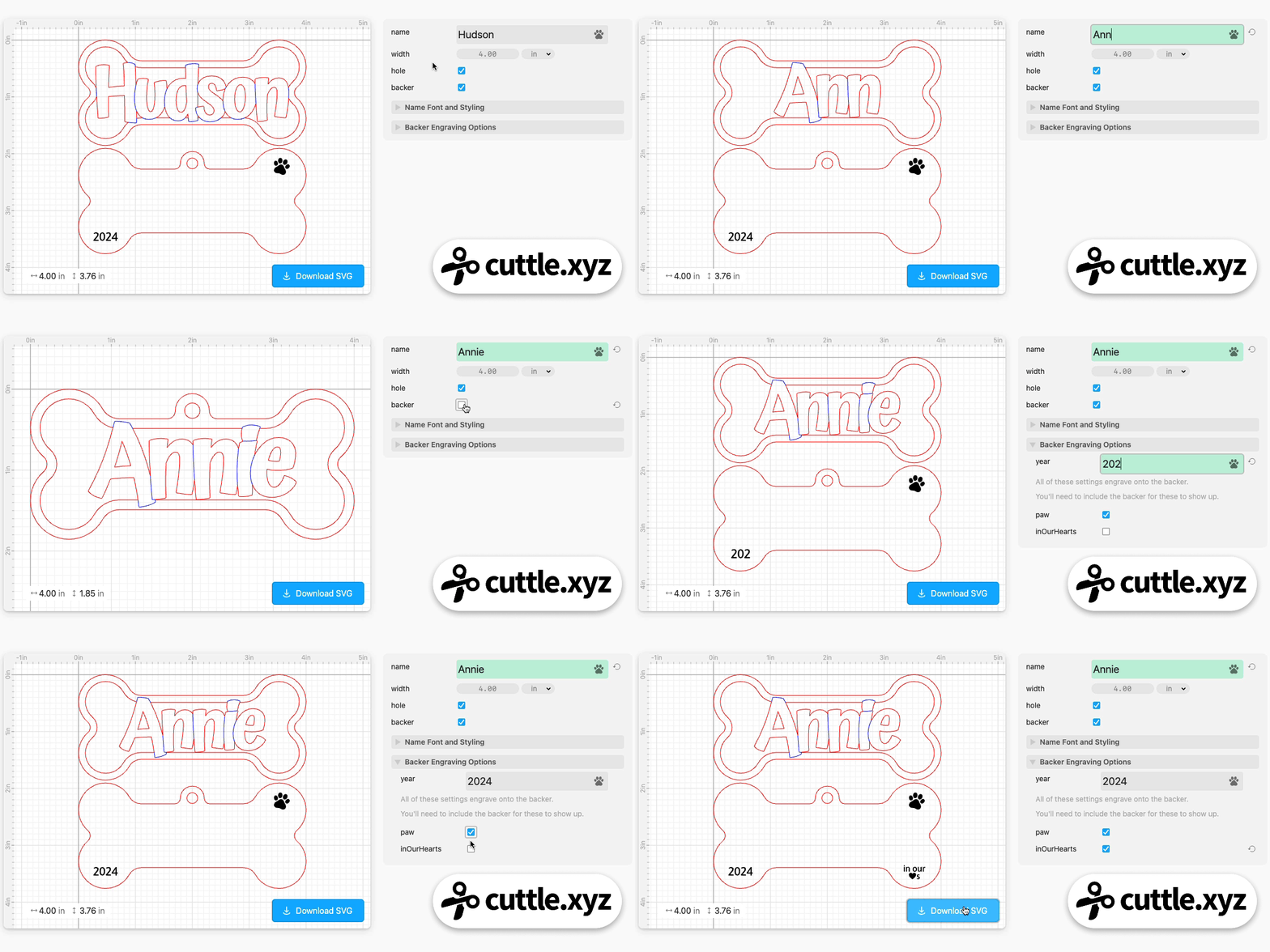
- The text is automatically sized to fit
- Dots on i’s automatically connect and everything is welded
- Letters are scored to make them pop
- Optionally engrave the year, paw print, or “in our ♥️s” onto the backer
- One or two layer option
Pet Ornaments 🐈 🐕
After last week’s Cat Face Ornament, so many people requested a dog version!

We’ve been sketching cartoon dog faces all week but haven’t yet hit a design we love. That’s why we’re throwing y’all a bone until we get that figured out 😅
Also remember Cuttle has a Paw Ornament template which is a classic!

Video Tutorial: Introduction to Components in the Cuttle Editor 📹

Federico’s livestream last week was an introduction to using components in the Cuttle Editor. Components are a powerful feature but can be tricky to wrap your head around!
Here are a few things you can do with components:
- Quickly create variations on a design.
- Make reusable shapes, like holes for mounting screws. If you need to adjust the hole, you change the component and it changes everywhere automatically.
- Make your own custom shapes that aren’t provided in the Cuttle left sidebar.
Video Tutorial: Make Your Own Templates with Multiple Names 📹

In Federico’s livestream yesterday he showed how to design your own templates that feature multiple names.
He creates a component that has a name parameter — for example a name in a heart — then reuses that component throughout a design to place multiple names around a year for an ornament or around a frame for a personalized picture frame.
Federico hosts a live stream on our Facebook Group every Thursday at 1pm PT / 2pm MT / 3pm CT / 4pm ET. See you there!
Other Improvements and Fixes 🐞
- Mask modifier: Fixed a bug where filled shapes were not inverted when “invertMask” was selected.
- Round Corners modifier: Fixed a bug where the endpoints of a closed path were merged if they were close together.
- Fit Within modifier is now out of BETA!
- UI nicety: we now auto-focus the comment text field when adding a new comment to a component or parameter.
- Fixed a bug where performance could slow down unnecessarily if an expression used
console. - Fixed a bug where Repeat modifiers with zero repetitions would appear like they had an error.
- Removed hidden handles from component thumbnails.
- Added Font and RichText to the Scripting Reference.

Toby Schachman